Control. Plan. Grow.

The money manager for freelancers, small businesses and expats.

Run your business, not a spreadsheet: see who owes you, photograph receipts that read and file themselves, catch a cash-flow gap before it hits, and keep business and personal money apart — or share one book with your team or your family. Free to start, no ads.

Free to start, no ads. Premium when you need it — billed via Google Play / App Store.
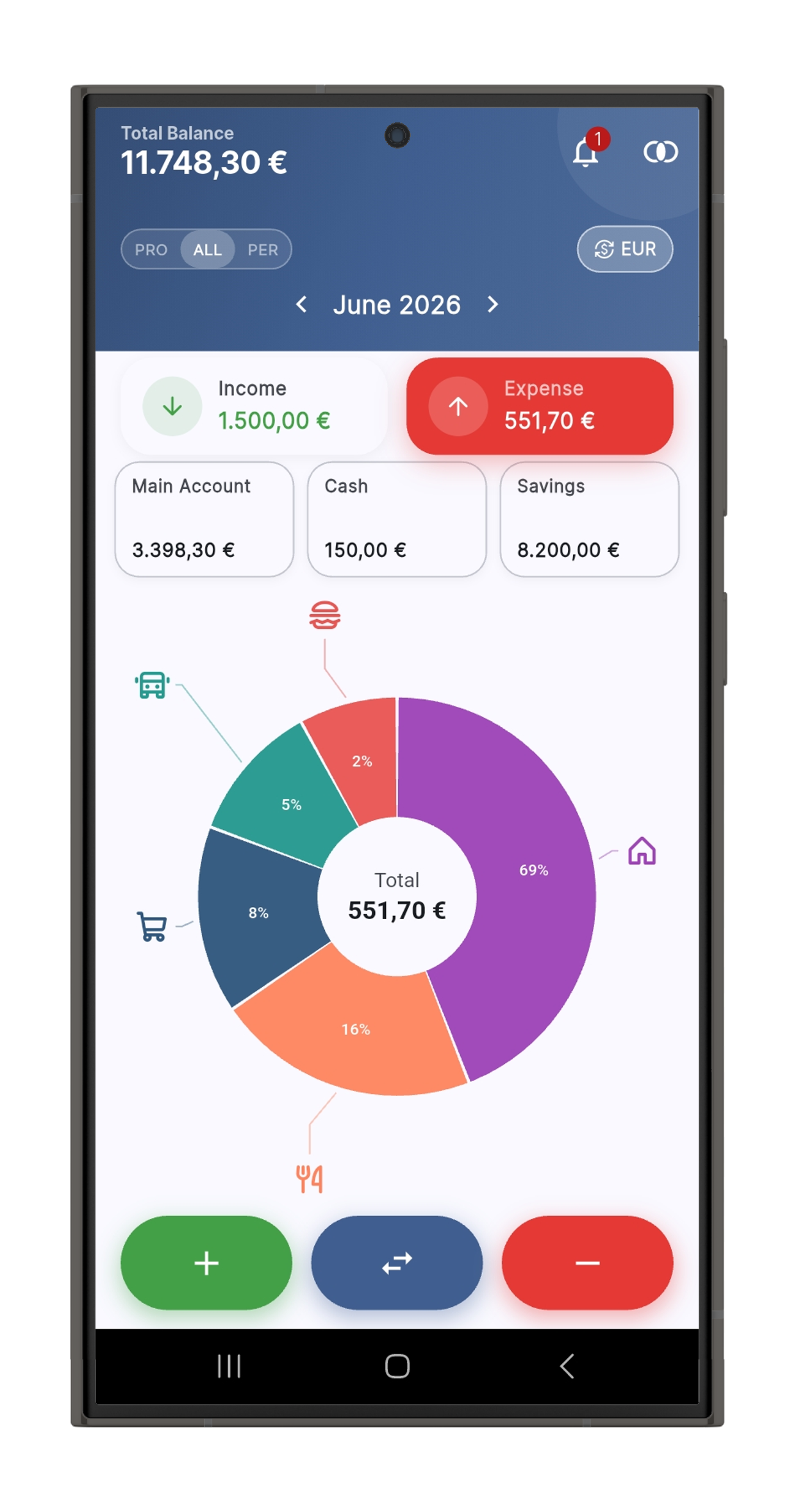
ZeniCash dashboard
  • No ads
  • No tracking
  • Works offline
  • Your data stays on your device
  • iOS & Android
  • Free forever

New in 1.5.0

Four things you no longer have to do by hand

  • Hunt for the receipt on the other phone

    Attached photos and PDFs now live in the cloud (a data centre in Europe) and open on whichever of your devices you pick up. Premium.

  • Remember when a bill falls due

    Any document with a due date — invoice, credit note, contract — can warn you a few days before and again on the day. Tap the alert and the document opens.

  • Type what a receipt says

    Point the camera and the app reads the supplier, tax number, document number, date and amount while you aim — on the phone, before the photo is even taken. From the second receipt of the same supplier on, it knows where to look. Premium.

  • Explain to an app that you have no company

    The professional/personal split is now optional: keep both, personal only, or business only. Switching it off hides nothing you already recorded.

Made for everyone. Powerful for those who need it.

Track personal finances for free with the same app freelancers, small businesses and families use to run their whole cash flow — every currency, every device, every invoice they have to track, and one book several people can keep together.

Multi-currency, multi-account

Bank, cash, credit and savings accounts in any currency. Automatic FX so totals make sense in your home currency, plus a per-currency filter when you need the raw view.

Categories with subcategories

Unlimited categories with custom icons and colours, and drill deeper with subcategories under each one. Reports break down by both levels.

Projects & cost centres

Group income and expenses by project or client. Reports and budgets per project — useful for freelancers tracking work across multiple customers.

Set limits. Stay on track.

Budget at the category or subcategory level — and per project. Configurable alert threshold and optional push notification when you cross it.

Day-precise cashflow forecast

See exactly when your balance is projected to drop — not just the month, but the day. Get a push alert before it happens, with overdraft awareness baked in.

Bank reconciliation

Import a CSV/OFX bank statement, auto-match transactions to your records, lock the reconciled period. The undo path is there if a transaction slips by.

Bring what you already have

Years of movements in a spreadsheet or another app? Export to CSV and import: you say what each column means, the app checks every line and tells you exactly what is missing before it writes anything. Invoices and payments come in too. Undo in one tap. Free.

Invoice & bill tracking

Record invoices you issued in your billing system and bills you received from suppliers. Register partial payments, credit notes, refunds. Statement per entity, always up to date. (ZeniCash records and tracks — it does not generate or send PDF invoices.)

Receipts that read themselves

Aim the camera and the supplier, tax number, document number, date and amount are filled in while you aim — on the phone, before the photo is even taken. Optional AI scan for hard receipts. Export anything to CSV, XLSX, OFX or a polished PDF report.

Recurring transactions

Define monthly, weekly, yearly or one-off recurrences. Tap the notification on the due date to register the transaction in one move.

Reports that actually report

Income vs. expense, breakdown by category and subcategory, by currency, by project. Pick a period; the chart does the rest.

Local-first, cloud-optional

Your data lives encrypted on the device. Cloud sync across up to 4 devices is available on Premium — for those who need it, opt in.

One book for a team or a family

A shared space: several people, each on their own phone, one set of accounts and movements. Creating one is Premium; joining is free, and one subscription covers everyone in it.

Which of these is you?

ZeniCash goes from a freelancer's back office to a two-second personal tracker.

For freelancers & small businesses

You do the work — chasing the money shouldn't be a second job.

  • Business and personal all tangled? Every account, budget and report carries a professional/personal split, so your books stay clean.
  • Lost track of who owes you? A running statement per client and supplier shows advances, credit notes and the real balance at a glance.
  • No idea which client or job actually pays? Give each project its own categories and budget, then read its real profit and loss.
  • Month-end always a scramble? Scan receipts that file themselves, reconcile against your bank file, and hand your accountant one PDF per transaction in a single ZIP.
Set up your business side — free

For expats & digital nomads

Living between currencies and never sure what you're really worth?

  • Balances scattered across currencies never add up — ZeniCash converts them honestly with automatic exchange rates, or free fixed rates you set yourself, and never zeroes a total in silence.
  • One bank per country adds up fast — keep every account, in every currency and country, side by side with unlimited accounts.
  • Your money life shouldn't be trapped on one phone — optional sync keeps up to 4 devices in step through your own Google or Apple account, and stays offline-first and private until you switch it on.
  • Official rates lie in emerging markets — set the parallel (blue) rate by hand so what you see matches what you'd really get on the street.
See your real balance

Also great for personal use

Budgeting without the clutter, the ads, or the sign-up

  • Tired of apps that make you tap forever? Log an expense in seconds — fully offline, no signal or account required.
  • No overwhelming spreadsheets: set up to 3 simple budgets with your own categories and see where the month is going at a glance.
  • Your money is nobody's business but yours: no ads, no tracking, your data stays on your phone behind a PIN.
  • Free forever, not a countdown to a paywall: 3 accounts, unlimited transactions, and pro tools waiting only if you ever want them.
Start free — no account, no ads

For teams and families

Two people, two phones, one book — without asking "did you already log that?"

  • Business partners logging on separate phones? A shared space keeps one set of accounts and movements: each of you records on your own device, everyone sees the same book.
  • A couple or a family running the house together? Same thing, at home: joining is free, and everyone keeps their own accounts inside the space — two "Savings" stay two.
  • Paying twice? One Premium subscription covers everyone in the space; the founder pays, the others are covered for as long as they are in it.
  • Leaving? Whoever leaves gets their own book back exactly as it was; the space stays intact for the others.
Set up a shared space

What ZeniCash does, in detail.

Real features available today. Free unless marked Premium.

Daily money and cashflow

  • Consolidated balance across every account on one screen
  • Income and expense logged in seconds
  • Recurring transactions for fixed bills and incomes
  • Bank reconciliation with period close and statement balance
  • Due-date alerts for any document — a few days before, and on the day
  • Live receipt reading: supplier, tax number, number, date and amount filled in while you aim the camera (Premium)

Invoice & bill tracking (Premium)

  • Record invoices you issued in your billing system and bills you received from suppliers — ZeniCash does NOT generate or send invoice PDFs
  • Automatic link between recorded invoices and bank transactions
  • Pending receivables surfaced on the dashboard
  • Customer and supplier advances with automatic allocation
  • Net balance per entity (what you owe, what is owed to you)

Budgets, categories and projects

  • Budgets per category, subcategory or project
  • Real-time spending vs budget tracking
  • Customizable categories with icons, colours and subcategories
  • Group income / expenses by project or cost-centre — reports per project
  • Full history per category and per project

Multi-account and multi-currency

  • Bank, cash, savings — multiple accounts in one place
  • Multiple currencies with automatic exchange rates (Premium)
  • One-tap transfers between accounts

Import and export

  • Import bank statement CSV files
  • Export transactions to Excel / CSV / OFX (Premium)
  • Receipt scanning (Premium) — the receipt is photographed and its data filled in automatically, on-device by default or by optional AI for tricky receipts. On the free plan the receipt is only attached, with no automatic reading.

Secure sync (Premium)

  • Automatic sync across up to 4 devices
  • Receipt photos and PDFs stored in the cloud (a data centre in Europe) and opened on any of your devices — new in 1.5.0
  • Sign in with Google or Apple
  • Data encrypted in transit and at rest (Google Firebase)

Sharing a book, and keeping it private

  • Shared space: one book kept together with family or a team — everyone sees the same accounts and movements. Creating a space is Premium; joining one is free
  • One Premium subscription covers everyone in the space
  • On joining, choose whether to carry your own records up into the space or start from the ones already there — starting clean keeps the personal copy in the cloud, so nothing is thrown away
  • App lock: a PIN to open the app, and the app kept out of the recents list
  • Possible duplicates (Premium): find records entered twice and choose which one stays
  • An account is identified by its own code, never by its name — renaming one cannot lose it, and two accounts sharing a name stay two

Free tier

Great for personal use, forever

  • 3 accounts
  • 3 budgets
  • 5 recurring movements
  • Unlimited categories and transactions
  • Receipt photos and PDFs attached to movements
  • Cash-flow forecast, import and local backup
  • Manual exchange rates (set your own)
  • Reports and charts
  • App lock with a PIN
  • Join a shared space someone else created
  • No ads, ever

Premium tier

Premium

Built for freelancers and small businesses

  • Unlimited accounts, budgets and recurring movements
  • Customers, suppliers and a running current account for each
  • Invoice & bill tracking, advances, partial payments, due-date alerts
  • Receipt reading on the phone (optional AI for hard ones) and PDF reports
  • The accountant package: one ZIP with a PDF per movement and the statements
  • Bank reconciliation, CSV / XLSX / OFX export
  • Projects / cost-centres with per-project reports
  • Automatic FX rates across currencies
  • Cloud sync across up to 4 devices, attachments included
  • Shared space for a family or a team — one subscription covers everyone in it
  • Possible duplicates: find records entered twice and pick the one that stays

€4.99/month or €39.99/year (save 33%)*. *Reference price in EUR — Google Play and the App Store show the exact price for your country, tax included where it applies, before you confirm.

Your financial data is yours. Receipt scanning is on-device by default — the photo stays on your phone; only the optional AI scan, which you switch on, sends it, and even then it isn't stored. Usage analytics stay off until you allow them. Crash reports are always sent, and carry nothing about your money. No ads, and no advertising identifiers. GDPR compliant.

Simple pricing. Premium is optional.

Use ZeniCash free for as long as you need. Upgrade when you outgrow the free tier — no ads on the free plan, Premium billed via Google Play / App Store.

Free

Great for personal use — forever

€0 forever
Get started
  • Up to 3 accounts
  • 3 budgets
  • Unlimited categories and transactions
  • Manual exchange rates (set your own)
  • Reports and charts
  • App lock with a PIN
  • Join a shared space (free)
  • Available in 24 languages
  • No ads, ever

Premium

Most popular

For freelancers and small businesses

From €4.99 / month *

or €39.99 / year — save 33%

Go Premium
  • Unlimited accounts and budgets
  • Invoice & bill tracking (records — does not generate PDFs)
  • Projects / cost-centres with per-project reports
  • Receipt scanning (on-device or optional AI) and PDF reports
  • Bank reconciliation, CSV/XLSX/OFX export
  • Cloud sync across up to 4 devices, attachments included
  • Automatic FX rates across currencies
  • Shared space — one subscription covers everyone in it

* Reference price in EUR. The actual price is set by your local Google Play or Apple App Store and may differ by country and by platform. The Free tier is permanent — no time limit, no nag screens. Premium billing is handled by Google Play and the App Store under their respective cancellation policies.

Questions people ask before installing

Short answers, each one true of the app as it is today.

Does ZeniCash generate invoices?
No. ZeniCash records the invoices you issue and the bills you receive, tracks what is paid and what is still owed, and hands the evidence to your accountant. Many countries require certified software to issue legal invoices — ZeniCash complements that software, it does not replace it.
Does it work without an internet connection?
Yes, entirely. A connection is only needed to sync between devices, to refresh exchange rates automatically and to use the optional AI receipt reading. Everything else — logging, receipts, reports, the accountant package — works offline.
Is it free? What does Premium add?
The free plan has no time limit and no ads: unlimited movements, 3 accounts, 3 budgets, 5 recurring movements, receipt attachments, cash-flow forecast, import, backup and a PIN lock. Premium adds unlimited accounts and budgets, automatic receipt reading, customers, suppliers and their current accounts, invoice and bill tracking, projects, bank reconciliation, exports, the accountant package, cloud sync on up to 4 devices with attachments in the cloud, a shared space, and automatic exchange rates.
Can two people — a couple, a family, business partners — use the same book?
Yes. A shared space is one book kept together by several people: each one logs on their own phone and everyone sees the same accounts and movements. Creating a space needs Premium; joining one is free, and one subscription covers everyone in it.
Can I keep business and personal money apart in one app?
Yes. Every movement, account, budget and document can be marked professional or personal, and reports and the accountant package filter on it. If you use the app only for yourself, or only for the business, you can switch that distinction off entirely.
Where do my receipt photos go?
Receipt reading happens on the phone; the image is not sent anywhere unless you switch on the optional AI reading, which asks for your consent first. With cloud sync on (Premium), attachments are stored in a data centre in Europe so they open on any of your devices.
Can my accountant use it?
That is what the accountant package is for: one ZIP with a PDF per movement sorted by account, the invoice documents in their own folder, and a spreadsheet with each account and each customer or supplier statement — dates and amounts as real dates and amounts.
Which currencies and languages?
Any currency, per account, per customer and per invoice. Exchange rates can be typed by hand (free) or refreshed automatically (Premium), and a rate you set yourself always wins. The app is available in 24 languages, including European and Brazilian Portuguese, English, Spanish, French and German.

Take back control of your money.

ZeniCash is free to install. Premium is there when — and only when — you need it.

Get the app